
Controls
There are lots of commands that can be used in order to enhance your gameplay here's a list and explanations
Looking for something in particular? Use the search bar at the top right of your screen on the gitbook.
General Controls
| Key | Action |
|---|---|
| T | To use the chat, then TAB to cycle through chat modes |
| E | Opens Interaction Menu (Player, Vehicle, Bag) |
| L | Inventory |
| Y | Clothing Menu |
| K | Opens your Phone |
| X | Put Hands Up! |
| N | Push to Talk |
| CTRL | Crouch |
| R CTRL | Crawl |
| F1 | Information Menu |
| F2 | Open Settings |
| F3 | Emote Menu |
| F5 | Gang Menu |
| F6 | To view your licenses |
| F9 | Open the stats menu |
| F10 | To view your warning logs |
| Caps | Loot Closest Bag |
| Home | Player List |
| Page UP | Cycle Proximity Chat (Whisper, Talking, Shouting) |
| L Alt | Talk over Radio (Radio is required) |
Vehicle Controls
| Key | Action |
|---|---|
| F | Enter/Leave vehicle |
| , (comma) | Lock/Unlock your vehicle |
| M | Vehicle control menu |
| INSERT | Livery menu |
| SHIFT+E | To push a nearby broken vehicle |
| CAPS | To get inside the car boot |
/flipcar | In chat to flip an overturned vehicle |
/setlastvehicleon | Turns the engine on, in your latest vehicle |
/interiorlights | Turns the interior lights on, in your vehicle |
Roleplay Controls
| Key | Action |
|---|---|
| B | Point finger |
| X | Put Hands Up! |
| ALT+G | To knockout a player with your gun |
| ALT+W | To whistle and wave hand |
| ALT+B | To place a headbag on the nearest player (requires 2 headbags) |
/k | In chat to get on your knees |
/th | In chat to take a player hostage (hostage must have their hands up) |
/carry | In chat to request to carry someone |
/piggyback | In chat to request to piggyback someone |
/me | This command allows you to display a specific text above your head head |
/999 | In chat to call the police to your location |
/showdl | Displays your driving license |
Police Controls / Commands
| Key | Action |
|---|---|
| Q | Toggle emergency lights / 1,2,3,4 for Sirens / additional 7,8,9 for non standard lights |
| F11 | Cuff Player |
| F7 | Opens the PNC Tablet |
| L Alt | Talk over Police Radio (Emergency radio is required) |
| SHIFT+G | To tackle the nearest player |
| ALT+D | To drag the nearest player in cuffs |
| ALT+G | To pull the nearest player out their vehicle |
/radios | In chat to open the radio menu |
/k9 | Manage your police dog |
/policehorse | Spawns a ride-able police horse |
/anpr | In chat to toggle ANPR menu |
/lockanpr | Locks the currently data displayed on the ANPR |
/flagr | Flags the vehicle clocked on your rear ANPR |
/flagf | Flags the vehiclec clocked on your front ANPR |
/trafficmenu | In chat to open the traffic menu |
/rt | In chat to reload tazer |
/handbook | In chat to open the PD handbook |
/clamp | In chat to clamp a vehicle |
/breathalyse | In chat to breathalyse the nearest player |
/blipson | Enables blips |
/blipsoff | Disables blips |
/cuff & /frontcuff | In chat to cuff the nearest player |
/panic | In chat to alert all PD members to your location |
/wc | Flash your police warrant card |
/viewprisoners | Shows a list of current prisoners (HMP) |
/setuparch | Setup a knife arch |
/removearch | Remove a knife arch |
/s60 | Authorsie a section 60 order (chief superintendent and above have access to use this command |
NHS Controls
| Key | Action |
|---|---|
| E | Press E (on person) > CPR > Observations > Shock Patient |
| U | To open the NHS Menu |
| F7 | Body Bag a dead player |
| Alt+A | Drag a body |
| ` | Call Manager |
| = | Accept Call |
| - | Deny Call |
Server Commands
| Command | Action |
|---|---|
/calladmin | This command will bring up a prompt menu on the left of your screen asking you to describe your issue. This is where you tell the Staff team the issue your facing and they will respond at the earliest convenience. |
/store | This command opens up the store interaction menu, which displays your current donation rank and any store bought items that haven't been claimed yet. |
/logicclub | This command opens up the Logic subscriptions' interaction menu and allows you to use the Logic Platinum and Logic Plus subscription perks. |
/craftbmx | Creates a bmx (To have access you must nitro boost the Logic discord) |
/craftmoped | Creates a moped (requires Logic Plus subscription) |
/dailyrewards | Opens your daily rewards menu each day redeem a reward |
/lottery | lottery tickets which can be purchased in a convenience store for £25,000 each. The lottery is drawn weekly and the winning player is drawn randomly from the pool of tickets. You can view the current amount in the pot and more by running the command /lottery |
/getmyid | This command will fetch your permanent ID which you might have to use in order to apply for roleplay factions or any purchases on the store that you might make. |
/getmytempid | Provides you with your temporary ID |
/anon | Sends a message in twitter anonymously |
/storeallweapons &/storecurrentweapon | These commands can be used to store weapons or items that you have on your person and are then accessible through your inventory at any time. they can also be re-binded to any key |
/storebackback | Stores wearable backpacks |
/unstuck | This command will teleport you to ground level if you find yourself stuck under the map and are unable to get out. Upon running the command you will have a prompt telling you to stay still for 30 seconds and then you will be teleported to the surface. |
/reset | Fixes texture loss in an area |
/e | /e [Emote] to start a emote/animation |
/e c | Cancels emote/animation |
/pet | This command opens up the Pet interaction menu, and allows you to use your in-game purchased pets. |
/showcompass | Enables a compass at the top of your screen |
/streetnames | Toggles on / off street names above minimap |
/togglekillfeed | To turn on and turn off the killfeed |
/russianroulette | Allows you to play russian roulette (Requires 1 bullet and a revolver) |
/radios | opens radio menu |
/hideallui | This command hides all the UIs on your screen, including: map, health, chat, tempids, notifications, weaponwheel. |
/hidechat | This command hides the chat |
/hideids | This command hides the tempids above players |
/hideui | This command hides the map, healthbar & weaponwheel |
/showallui | This command shows all previously hidden uis. |
/joinevent | This command allows you to join an in-game event when one is hosted. |
/leaveevent | This command allows you to leave and on-going event |
/vsync | This command allows you to reset/restart your voice chat |
/crosshair | Logic supports the use of custom crosshairs and you do not have to run any external software to do so. With this menu you can customise and create a crosshair to suit your needs. See an image below. |
/setsmoke | Toggle the smoke trail on (for planes) |
/togglesmoke | Toggle the smoke trail off |
/djmenu | Opens the DJ Menu interaction menu |
/dl | To manage your driving licence |
/phonepin | This command will show your phone pin in chat (only visible to you) in case you ever forget your four-digit password to enter your phone. |
Discord Commands
| Command | Action |
|---|---|
!checkhours | Check how many hours you have in the server |
!forums | Gives a link to the forums |
!wiki | Gives a link to the wiki page |
!banappeal | Gives a link to create an unban appeal |
!store | Links you to the store |
/resetpassword | Reset a social account password on your ingame phone |
!getroles | Receive any missing roles in the discord |
!gco | Get Car Owner, shows the owners of a specific vehicle spawncode |
!hmc | How Many Cars, shows the amount of owners of a specific vehicle spawncode |
!locklist | Provides you with the sheet displaying all baller locked vehicles in the server |
!bid | Allows you to bid on an auction |
!carreport | Allows you to submit a report regarding a broken car to the car developers |
!connect | Give you the server ip - F8 -> connect 151.247.196.170:30120 |
!server-status | The latest information regarding the status of all of our services |
!linktwitter | Link your twitter account to your Logic account for a ingame reward |
!crashes | To find your FiveM crash files navigate to this directory: |
!loadingsong | Provides you with the link of the song being used in the loading screen |
!catalogue | Provides you with the link to the catalogue vehicles, available as custom imports |
!help | Provides you a list of all commands |
Keybinds
| How to create a custom keybind | How to remove a custom keybind |
|---|---|
Press F8 Type: bind KEYBOARD G "e carry" | Press F8 Type: unbind keyboard G |
Logic Custom Keybinds
Settings > Keybinds > Logic
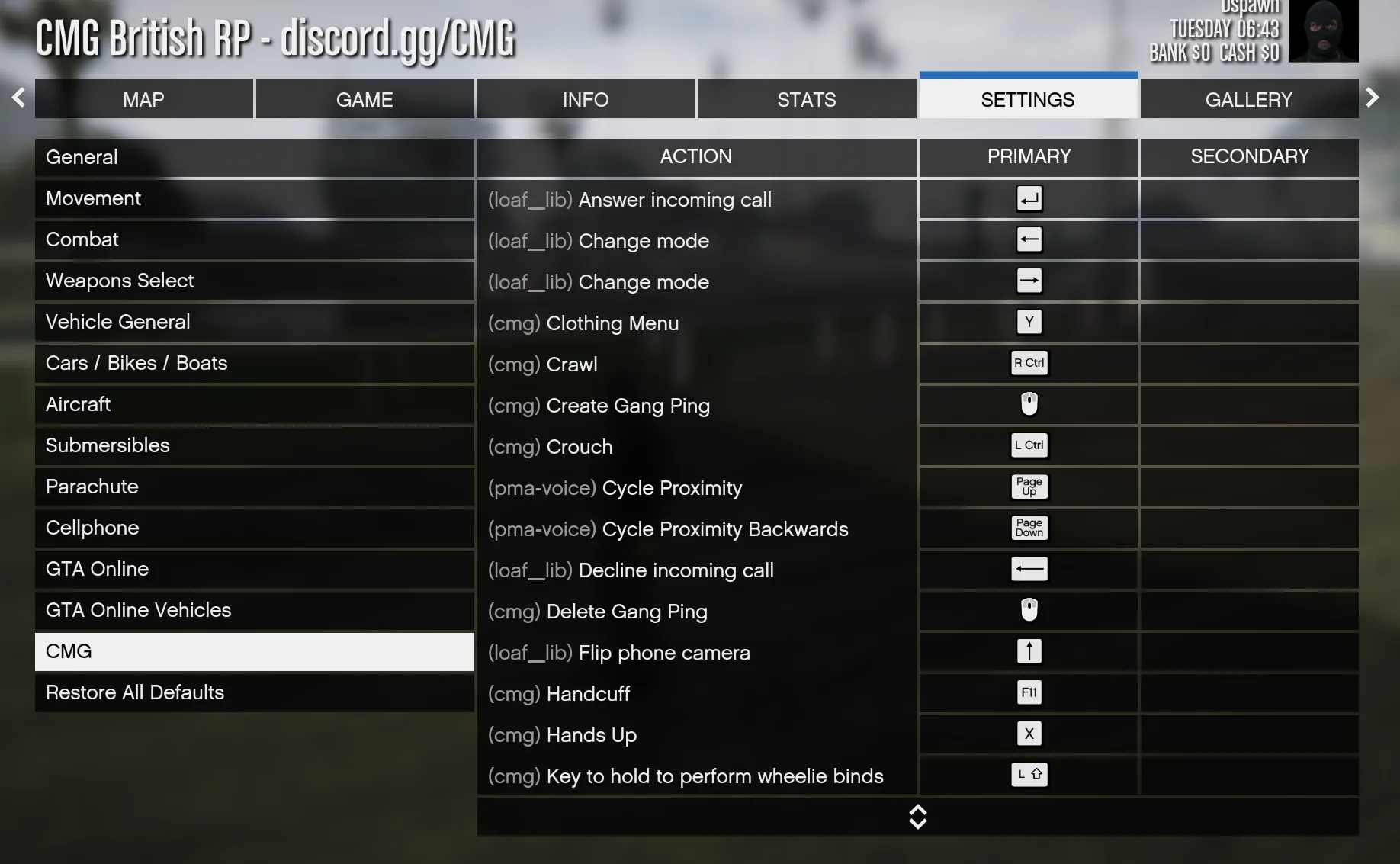 You can rebind/edit to any key